
Technical SEO Fundamentals
As it is well known, search engines act as a gateway for users to find websites and products including information. It is also important to point out that creating a website is not sufficient to ensure that it is included in Google search results. There are various steps that have to be taken care of in order for search engines to recognize and display contents correctly, including important basic concepts such as crawlability, indexability, and how search engines behave.
external link: https://developers.google.com/search/docs/fundamentals/get-started
Internal link :https://staging.shaikhtahira.in/site-map/
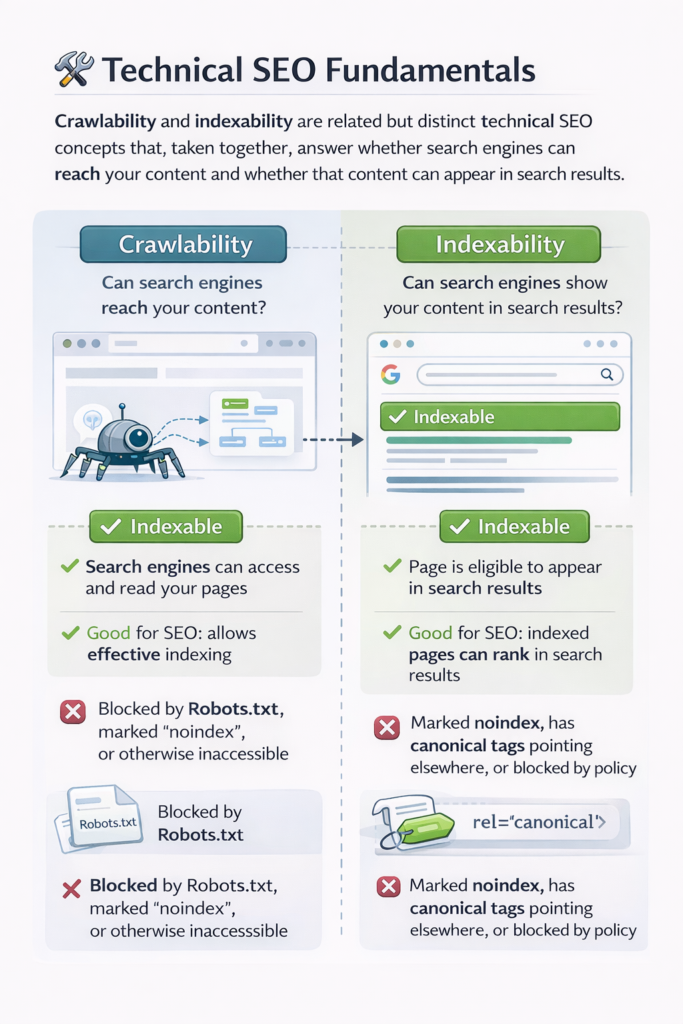
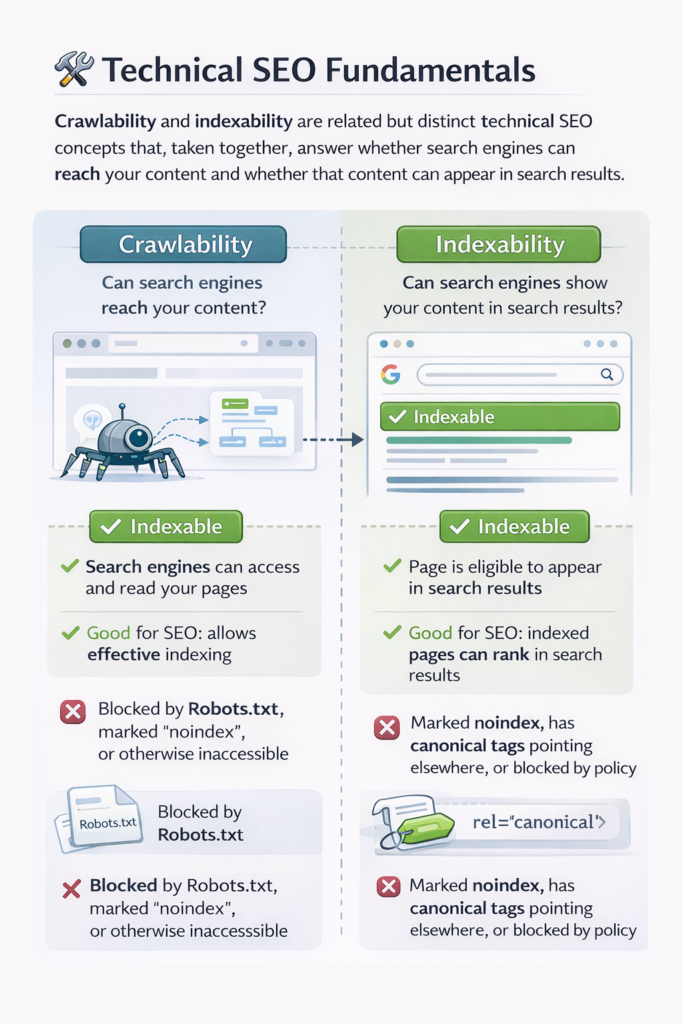
Crawlability and Indexability: Crawlability and indexability are related but distinct technical SEO concepts that, taken together, answer whether search engines can reach your content and whether that content can appear in search results.
Crawling means the extent to which search engines can crawl or access and read your website pages. When a given search engine like Google sends its crawler, Googlebot, to your site, that crawler needs to load the page, follow the links, and fetch content
Indexability refers to whether a page that has already been crawled is allowed to be stored in the search engine’s index and shown to users in search results.A website can be crawlable but not indexable, and it can also be indexable but poorly crawlable. In any case, for SEO success, both of these have to work in conjunction.
- Crawling deals with access.
- Indexability refers to permission to show up in search results.
- Both are controlled via technical settings, server responses, and/or HTML directives.
Key factors affecting crawlability
- Robots.txt rules
- Server errors: 500, 403, 404
- Internal linking structure
- JavaScript rendering issues
- Page Speed and Stability
Key factors that affect indexability
- Meta robots tags
- X-Robots-Tag HTTP headers
- Canonical tags Duplicate content handling
Practical example :A product page displays properly and is not restricted by robots. txt. Google can visit it. This page is crawlable.And that same page contains:In which case the page is not indexable even though Google can access it.
Sitemap URL :A sitemap URL is the URL of the location your sitemap file is accessible from. It makes search engines find the important pages of your site!Sitemap does not help in ranking factor, but it helps discoverability and crawling the site fast specially, if your site is big enough/new or with weak internal linkings.A sitemap is an organised list of URLs.It is primarily authored for search engines.It makes it easier for search engines to access your pages.
Common sitemap URL structure: https://www.store.com/sitemap.xml
That URL is then submitted in GSC where Google will now crawl it often.
What Are the Different Types of Sitemaps? There are two popular type of sitemaps: XML and HTML. Both have a different role and ideally belong together.
XML Sitemap:An XML sitemap is generated for search engines. It holds structured data about the URLs on your site and presents this information to the search engines’ crawlers, so that they can more intelligently crawl your site.It is based on a format developed
Benefits of XML sitemaps
Improves crawling efficiency / Helps large websites manage discovery/ Assists fresh pages to be found quickly.
Common parts of an XML sitemap – URL of the page – last update date (optional
HTML Sitemap: HTML sitemap is created with the aim of serving the users. It is a page on the website that shows the important pages and sections.HTML sitemap is not necessarily required, but it helps the users and also enhances internal linking, which indirectly aids the SEO
HTML sitemap is created with the aim of serving the users.HTML sitemap enhances the site navigation.
Benefits: The system provides help for users to locate their needed information. The system enables search engines to find website content because of its internal linking structure. The system enables people with disabilities to access the website while making it easier for all users to navigate.
The website presents its HTML content through a sitemap which displays all of its pages. The website uses both Yoast SEO and Rank Math as its main SEO tools for WordPress. The tools enable users to handle both their technical SEO work and their on-page SEO tasks.
The two plugins offer website owners tools which enable them to optimize their website content without needing programming skills. The system provides users with automated tools which create sitemaps and handle all meta data requirements. The system provides users with two common features which include Meta title and description editor and XML sitemap generator and Canonical URL settings and Robots meta controls and Schema and structured data support. The two plugins offer different methods to create sitemaps which contain metadata.
Yoast SEO provides a straightforward interface which enables users to complete their tasks. The platform enables content writers to develop their materials through its comprehensive analysis system. The system maintains high performance standards because of its extensive compatibility with different systems.
What is Google Search?
Google Search provides a definition which describes the web search service as a tool that enables users to locate online materials and web pages and Internet content. Google operates an automated system which discovers different web pages and saves them in its database while determining their search engine ranking.The system operates through three essential functions of crawling and indexing and ranking.
Google uses bots to explore the web.The system stores discovered web pages in a large scale index.the algorithms determine which web pages will show up in search results.
How Google Search works
- Googlebot visits all websites on the internet.
- The system examines all website content to extract information.
Robots.txt
The file Robots.txt serves as a textual document found in the main directory of a website which governs the crawling behavior of search engine bots on the website.The system does not function as an indexing control system. The system only affects how web crawlers will explore the website.
The system shows which areas web crawbots should avoid.
The document exists in public view and anyone can read it.
The document establishes rules that apply throughout the entire website.
Typical use cases
The system restricts access to administrative sections.
The system restricts access to testing environments.
The system restricts access to folders that contain internal system files.
The basic structure of robots.txt file consists of two main components. The first component includes direct instructions which tell web crawlers how to handle the website content.
The second component contains specific website access restrictions which web crawlers must follow.
Canonical Tag: The canonical tag directs search engines to identify which page version should be viewed as the main page when two or more pages share similar content.Multiple factors lead to duplicate content creation which includes filters and tracking parameters and sorting options and multiple URLs that display identical content.
The system assembles different ranking indicators into a single unified strength.
The system protects against empty content duplication which creates content similarity problems
The system establishes better understanding between search engines and its content.
Why canonical tags are important
- Search engines may split ranking signals across duplicates.
- Search results show incorrect URLs to users.
- Crawling budget can be wasted.
- Canonical tag example
Meta Robots Tags
Meta robots tags are used on a particular web page and are included in the HTML header section. These tags determine whether a web page can be indexed and whether the links on the page can be followed.
Meta robots tags only apply to a particular web page
Meta robots tags override the default indexing option.
Meta robots tags are important for content management.
Common Meta Robots Directives
Index
No index
follow
No follow
Example of Meta Robots Tag to Allow Indexing :<meta name=”robots” content=”index, follow”>
When to use meta robots
- Thank-you pages
- Internal search result pages
- Duplicate filtered pages
- Temporary campaign pages
Relationship Between Robots.txt, Meta Robots, and Canonical
These three elements work together but for different purposes.
**Robots.txt**: Controls crawling, Works at site or directory level
*Meta Robots**: Controls indexing and link behavior ,Works at page level
**Canonical**: Selects preferred URL, Works at content duplication level
Practical example: Filtered product pages can be crawlable (not in robots.txt), noindexed using meta robots, and canonicalized to the main product URL. This is important for Google to crawl the page while preventing index pollution.
Crawl Budget and Its Relationship with Technical SEO
Crawl budget is the number of pages a search engine is willing to crawl from a website within a certain period of time.For small websites, crawl budget is not a problem. However, for large websites, crawl budget is a major concern.
Factors affecting crawl budget
- Server performance
- Internal linking
- Duplicate URLs, URL parameters
- Poor canonicalization
How sitemaps and robots help: Sitemaps help bots navigate the site to the important pages.
**Robots.txt** is important for preventing crawling waste.
**Canonical** is important for consolidating duplicate content.
**Canonical**consolidates duplicates
Practical Ecommerce Example: Imagine you run an online jewelry store with many different versions of the same ring.
URLs Generated :/products/forever-glow-ring/products/forever-glow-ring?size=6
What search engines might do if no SEO
- configuration is in place Crawl all versions of the product
- Index many versions of the same product
- Divide the PageRank of the product
What the correct configuration looks like
- Use canonical tag with the original product URL
- Allow crawling of the URL
- Use noindex if desired
- Include original product URLs in the XML sitemap
Why All These Elements Matter :
Crawl refers to the search engine’s ability to explore your website.
Index refers to whether your content is visible to the public.
Sitemap is a map of your website’s pages.
The robots.txt file is a set of rules for crawling.
The canonical tag refers to how you handle duplicate content.
The meta robots tag refers to how you handle each page’s index statuS